A new generation feature phone specifically designed for the needs of the elderly adults.
Overview
This is my masters thesis project at IITD done in association with Lava Mobiles. It has been awarded top 5 thesis displays during the design degree show at IITD in 2024. The Indian cultural ethos emphasizes reverence and care for the elderly, reflecting a societal value deeply ingrained in its fabric. As the global population ages, India stands as a notable example with the proportion of elderly individuals projected to reach up to 20% by 2050 (UNFPA, 2023). This demographic shift underscores the urgent need for inclusive product design to cater to their specific needs and challenges. Elderly individuals face a myriad of unique obstacles encompassing various aspects of health and overall well-being. From physical frailty to sensory impairments and organ dysfunctions, these factors significantly impede their ability to perform even the most basic daily tasks, exacerbating their sense of dependence and vulnerability. When designing for the elderly, taking feedback and involving them in the process is more important than ever. This is due to the fact that the elderly being from a different generation have different mental models, perceptions, ideologies and concerns. Their perspectives, shaped by different experiences and concerns, offer valuable insights for creating solutions that truly meet their needs. Therefore, as I embark on my research journey, I prioritize understanding and addressing these unique considerations to develop designs that empower and enrich the lives of the elderly.
Why this project?
My grandfather enjoys living alone in his hometown, a place filled with cherished memories. While we respect his choice, he often faces challenges and is reluctant to seek help, which worries us about his well-being. Elderly individuals typically struggle with technology due to its complexities and their declining skills, despite its significant benefits. Therefore, this project aims to develop a smart IoT-enabled device to enhance the well-being of the elderly.
Initial research
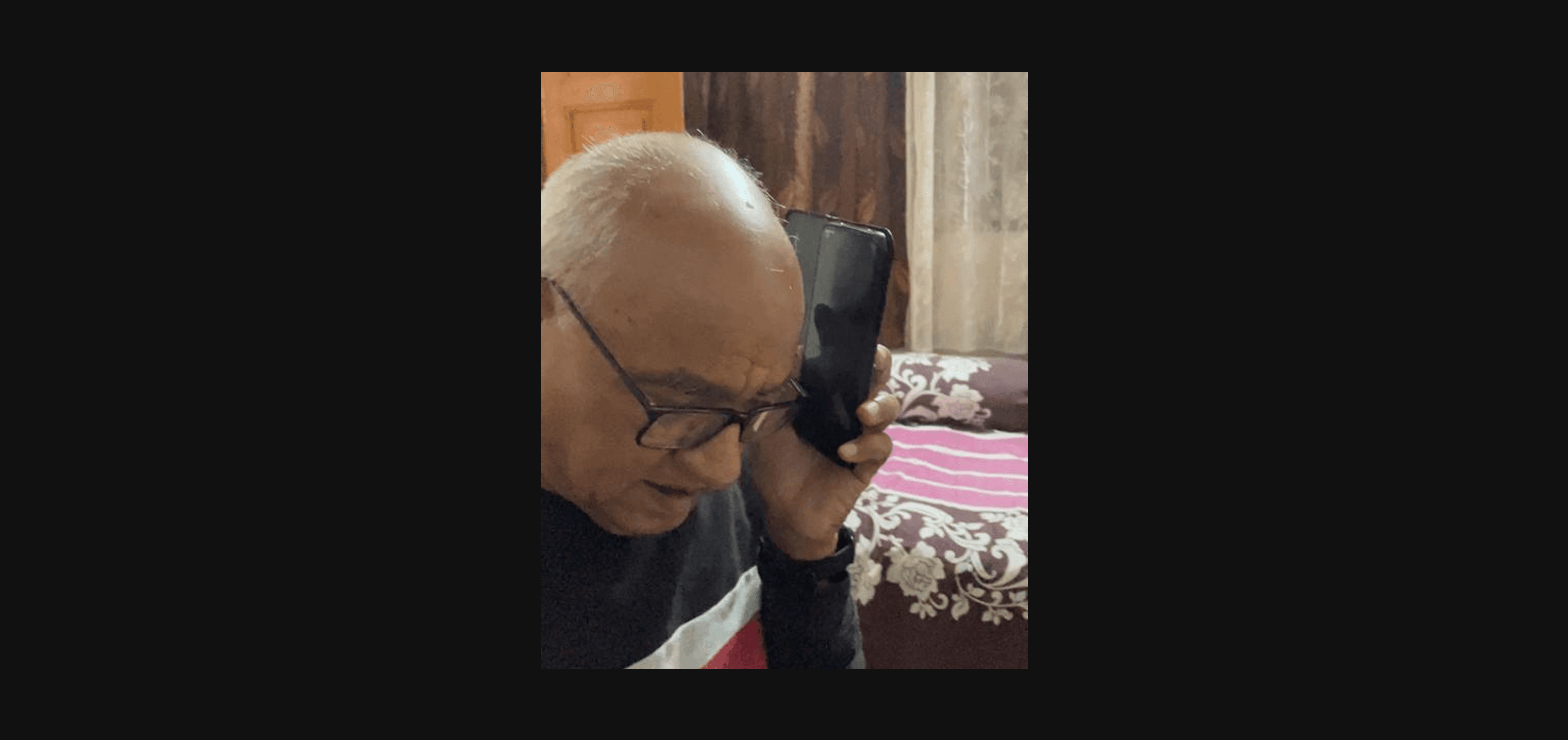
The research started with, interviews and observations in various households with elderly residents. An understanding of their daily activities and challenges was developed. Since the target area of the project was consumer electronics, special attention was paid to the appliances and devices being used by the elderly. A study was done to map out the interactions happening in various smartphone tasks. The tasks were initially grouped into two categories: the tasks that are currently being used by the elderly, and the ones that have a potential for them to be able to use if the task complexity, challenge and risk levels were reduced. The interactions happening in these tasks were listed and the tasks were regrouped into 2 categories: Utility and entertainment.
Much of the technological advancements are happening in the field of wearable technology, so it was a worthwhile consideration to understand the perception of the elderly towards smartwatches. Smartwatches nowadays offer a lot of features including health monitoring, location tracking, and even calling. Despite this plethora of features being offered right at the wrist, smartwatches are not very actively being used by the elderly because of multiple reasons such as small screen size, tiny font size, complex interfaces, discomfort while wearing for long durations, and difficulty in navigating through multiple functions. Additionally, the tiny displays and touch-based gestures pose significant challenges for elderly users who may have reduced dexterity and vision. To get a better understanding of these challenges, an elderly individual was introduced to a smartwatch and was requested to wear it for 24 hours. Observations were made on the usage, and detailed feedback was taken.
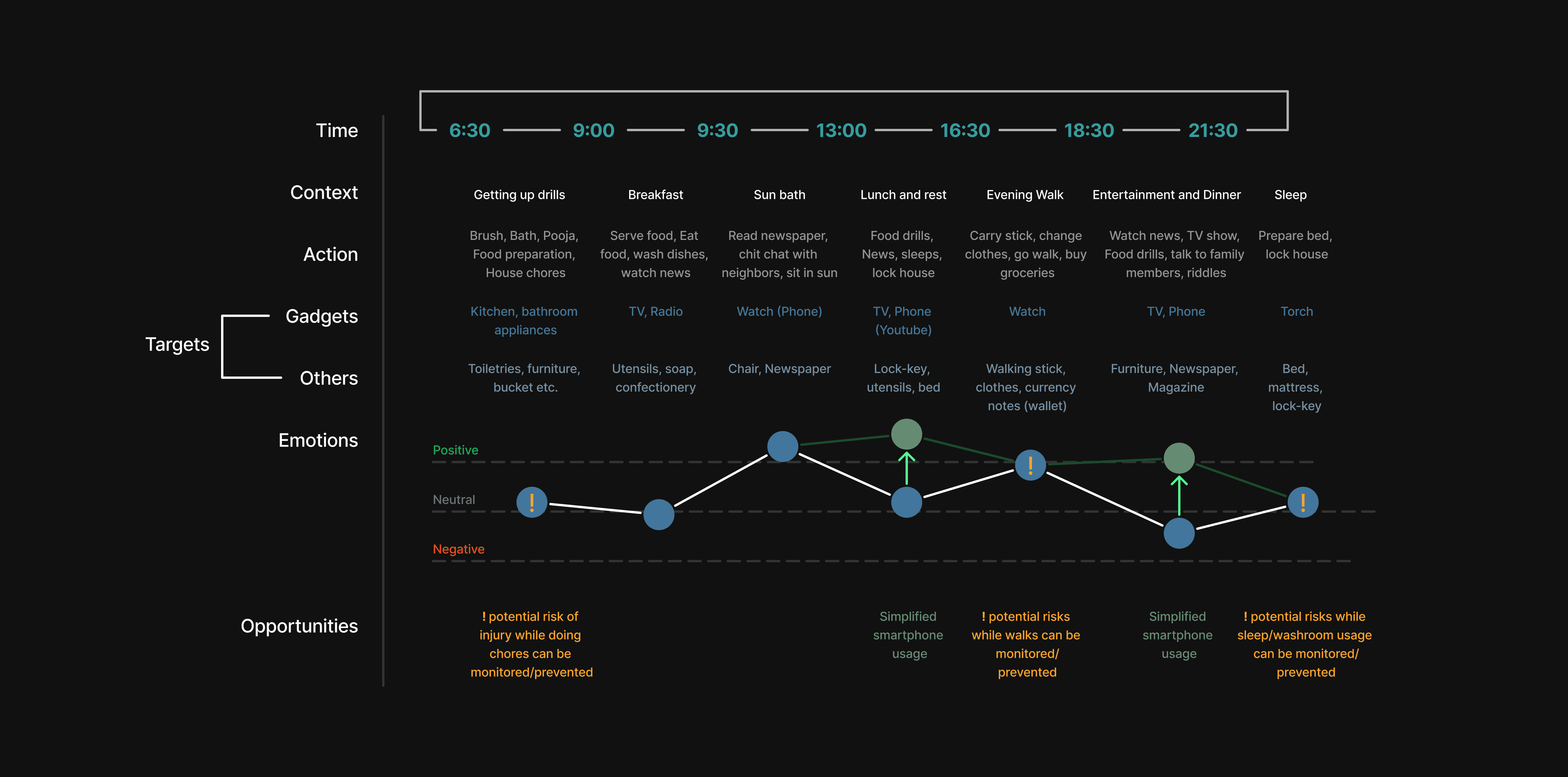
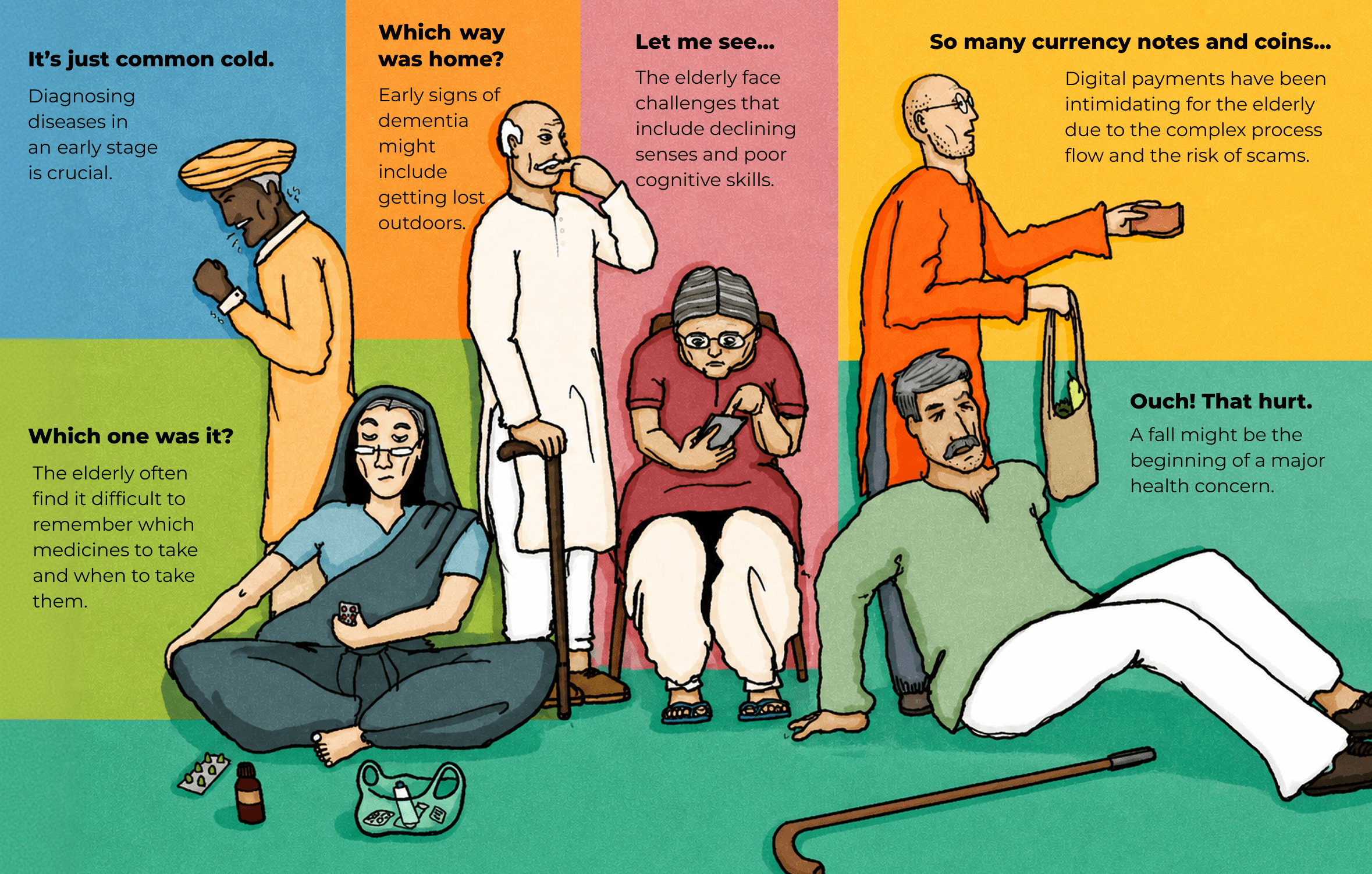
To dig deeper into understanding the problems faced by the elderly and their day-to-day activities, shadowing was done to map out the daily routine of an elderly individual. This mapping also includes the list of actions they perform, duration of tasks, targets that they interact with (categorised into gadgets and others owing to the scope of the research), emotional stage, and opportunities identified specific to the context. From the list of opportunities, two categories of opportunities can be noted, one is where there are potential risks and the other is where there are potential user experience enhancements possible. From these opportunities, various scenarios were created to highlight real-world problems in a story-like format. From each scenario, a potential intervention can be identified.
The user
Based on the insights drawn, the primary research conducted and an understanding of the company’s goals, a target user group was identified and a persona was developed. This persona is of an elderly male with a monthly income of 30,000 INR from pension and rent. He lives alone in a tier 3 city. The user faces certain major and minor health challenges. The children of the user are concerned about the health and well-being of the elderly. The user on the other hand wants to be independent and feels hesitant to disturb his children for what he considers as “minor inconveniences”. The user has been very comfortable with a keypad phone but was recently given a smartphone by his children. He feels that the device is very complicated but has managed to learn how to use YouTube on it, attend incoming calls, and make calls. All other features and applications are not used by the elderly. The user avoids carrying this phone while going outdoors as it feels too heavy in the pocket. The user now wishes to go back to using their keypad phone as they are also concerned about getting addicted to YouTube and declining eye-sight. Their children are concerned about this and try looking up portable small-size smart devices but can not find anything that meets their requirements.
The buyer
The majority of the time, it might not be an elderly individual who is making a purchase when it comes to buying gadgets. This could be due to their unfamiliarity with the technological advancements in the world. It is their children who end up buying things for them and making the gadget purchase decisions. This brings up a very interesting pointer: if the device could also cater to the needs of the buyers, then it becomes a more promising deal for them to invest in. Thus, the needs of the buyers were identified and a buyer persona was created. The persona is of a 35-year-old adult male who lives with his wife and kids in a Tier 1 city. The adult wants to develop his career and can not attend to his parent very frequently. (the parent being the user persona) He has requested his elderly parent to come live with him but the elderly does not like the tier 1 city’s lifestyle and feels more comfortable living in his self-built house in his hometown. This causes a lot of concern to the young adult who wants to ensure his parent’s well-being. He gifts him a smartphone to enable him to utilise some fun and engaging apps like YouTube and WhatsApp. His father often forgets to take his medicines and this bothers him a lot. He feels frustrated when he can not help his parent with the problems he is facing.
Secondary Research
After assessing the needs of the users and the buyers, a lot of potential design interventions can be thought of, but not all might be executable due to the technological constraints. To create feasible designs, a literature study was done on various technologies being used in the healthcare and consumer electronics industries. This study covered the following technologies:
Blood Pressure Measurement
Blood Oxygen Level Measurement (SpO2)
Pulse monitoring and ECG
Temperature Monitoring
Step counting and Fall detection
Glucose Monitoring
Navigation technologies
Touch screen technologies
Display technologies
Battery technologies
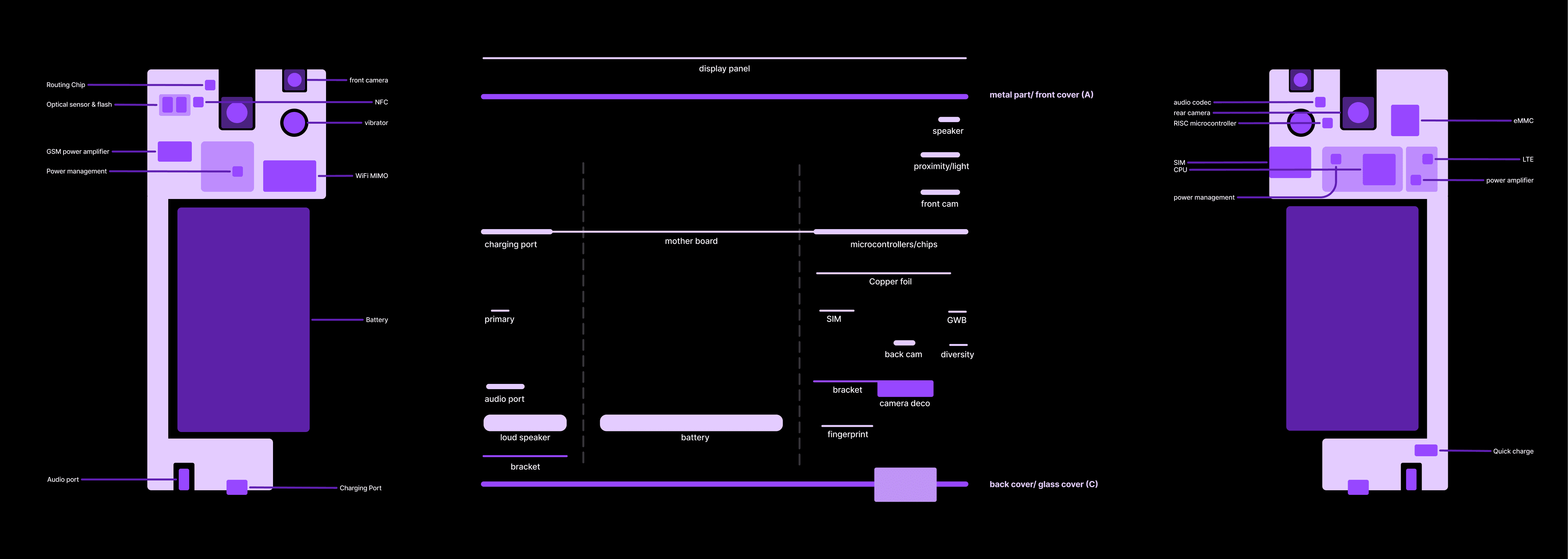
Smart phone and smart watch component breakdowns
The two types
There are 2 types of mobile phones in the market, The tactile keypad phones and the touch based smartphones. Despite the keypad phones being almost extinct in the Tier 1 cities, they are in high demand in Tier 2 and below cities. One of the major users of this device are the elderly. There are two categories of the features that the elderly engage with while using these phones. First is utility-based features, and second is entertainment-based. The proposed solution focuses on the utilitarian aspect to keep the focus precise.
Current solutions and their challenges
Reminder/memo apps help manage tasks and appointments effectively, but their usage
process is often cumbersome and confusing for the elderly.
UPI apps offer a convenient, cash-free payment experience, but their complex interfaces pose challenges and scam risks for the elderly.
Google Maps offers real-time navigation and location tracking, but its complicated and cluttered interface poses usability challenges for the elderly.
Assistive devices offer alternatives to touch based interfaces, aiding the elderly in technology interaction, yet their bulkiness and lack of portability pose convenience challenges.
Smartwatches offer health parameter measurement and fall monitoring, supplying vital
health data and safety alerts, yet discomfort and small displays deter many elderly users
Design Brief
To create a portable and ergonomic smart device for the elderly that enables them to enhance and upgrade their feature phone experience by allowing simplified interactions with traditionally complex tasks at par with their mental models.
Process
I followed a fluidic participatory design process for this project. This allowed me to involve the user at multiple stages of designing, ensuring that every decision is in tune with their needs.

The design: Simple
A next generation feature phone with essential utilitarian features that is portable, ergonomic and easy to use for the elderly.
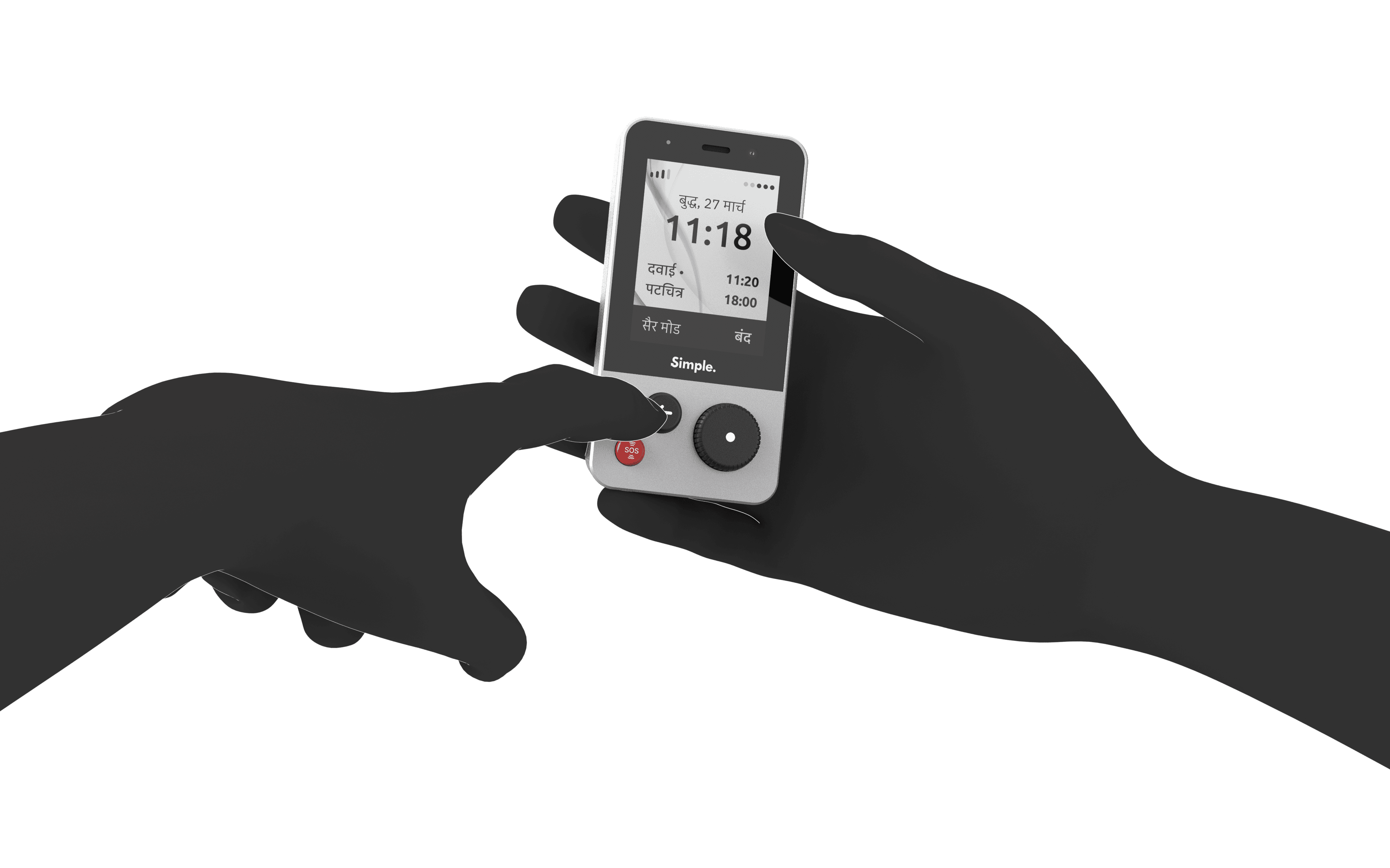
The three buttons
An SOS button that can be tapped thrice to call help instantly.
A rotating knob selector for navigating.
A back button for going back/cancelling.
Features
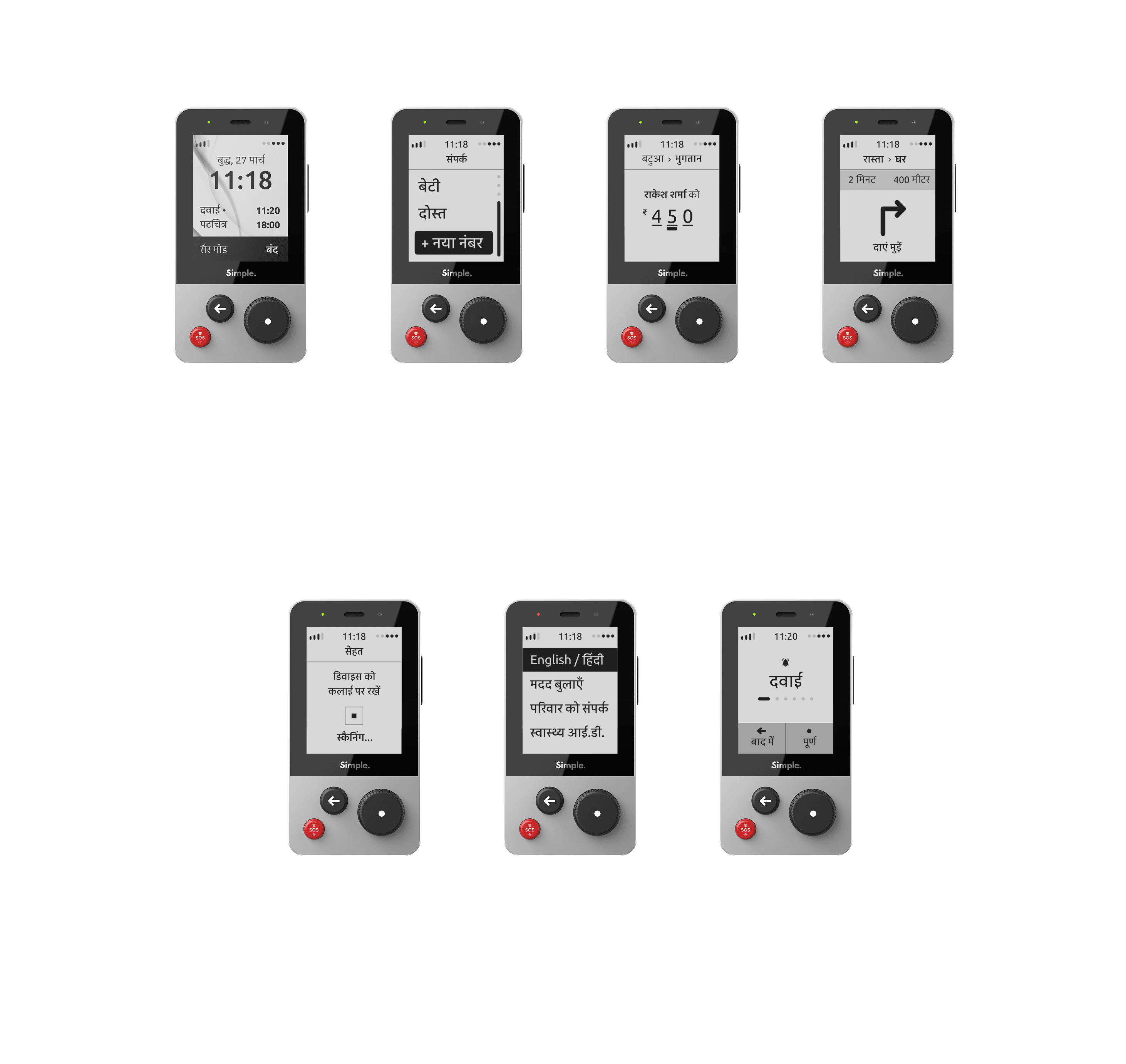
Digital Payments: One of the key features of this device is an in-built wallet. The device integrates UPI lite to enable the elderly to make small digital transactions without having to memorize a pin.
Navigation: The device features a simplified version of the Maps app to allow the elderly to save locations and navigate to them. The device also provides the users to access their previously visited locations in the past 24 hours, saved every hour.
Health Monitoring: The device incorporates a PPG sensor and a temperature sensor on the back that allows the elderly to quickly monitor 3 essential health parameters: Heart rate, SpO2, and Body temperature.
Walk Mode: By default, the phone measures the device’s location every hour but upon detecting slow paced outdoor movement this mode is activated. Once activated, the device monitors the location constantly and can help the user trace their path back incase they get lost.
SOS & Fall detection: The device has a custom SOS button that can be activated in case of emergency by the user or can be initiated automatically if a fall is detected. Upon initiation, the location of the device is shared to the concerned and a call can also be initiated.
Reminders: The device provides a feature of Reminders that is completely voice operated. The user can add reminders as voice recordings and the smart algorithm would detect speech from text to alert the user on the said time.
Call: One of the most essential feature being used by the elderly. The device can display up
to 10 contacts. New contacts can be saved using voice.
Torch: The device has a torch on the top of the device which can be activated by tapping the power button twice.
Caregiver’s App: Apart from the mobile phone, an external app provides caregivers control to receive alerts, set reminders and monitor well-being of the elderly individuals. (This app was not developed in the limited scope and time constraints of this project.)
User testing
As mentioned in the beginning of this project, involving the elderly in every step of the process is pivotal for the design decisions. The user testing was done in multiple stages to ensure the same.
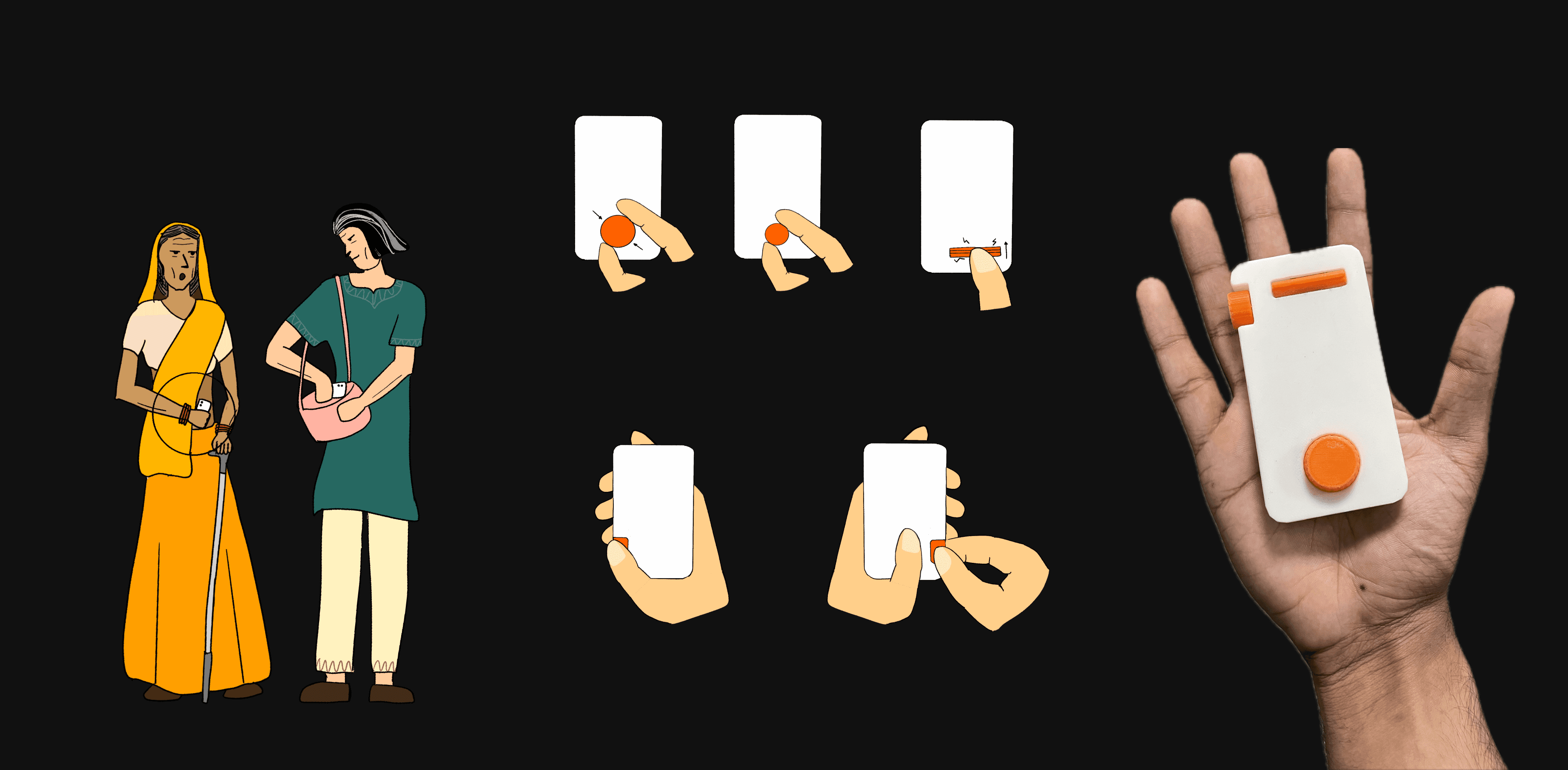
Stage 1: Input Methods
Navigation and input methods was one of the key interaction challenges that was to be solved. The phone required to have a simple interaction for navigating and inputing numbers. After exploring multiple options, 6 physical buttons were identified and collected in two 3-D printed prototypes. These prototypes were then tested with the users and rated based on comfort and usability. Open ended feedback was also received that helped refine the most preferred input type- the rotary knob.
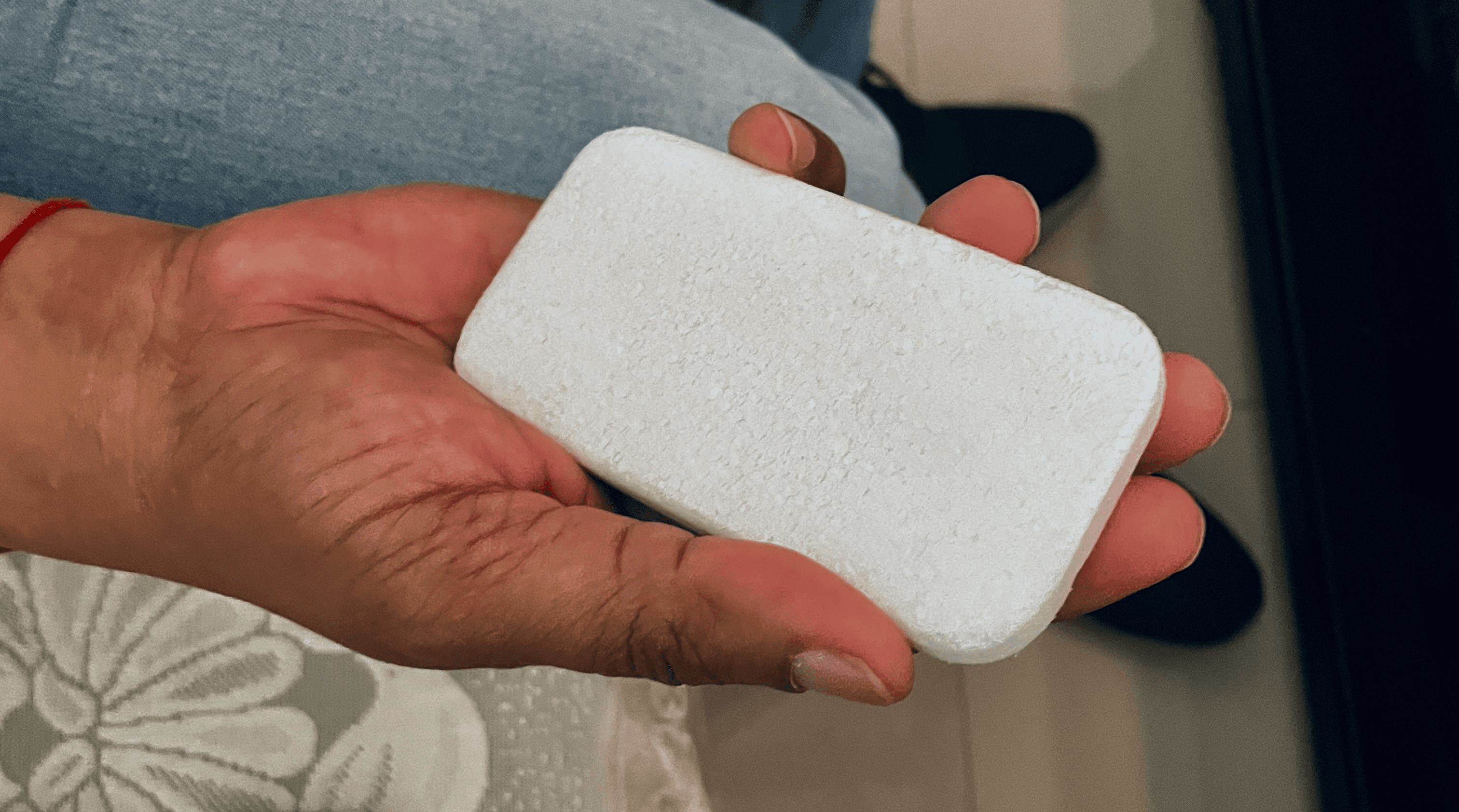
Stage 2: Form
3 styrofoam forms were created with slight modifications in the fillets, chamfers and corner radii. These were then taken for feedback to a separate elderly audience for comfort and grip feedback.
Stage 3: Interface Testing
A touch based UI was created on Figma and presented to the elderly with specific tasks to be completed on the phone. This study evaluated the Usability, Readability, Cognitive Load, Process complexity and error rates. Feedback from this study was used to later refine the User Interface.
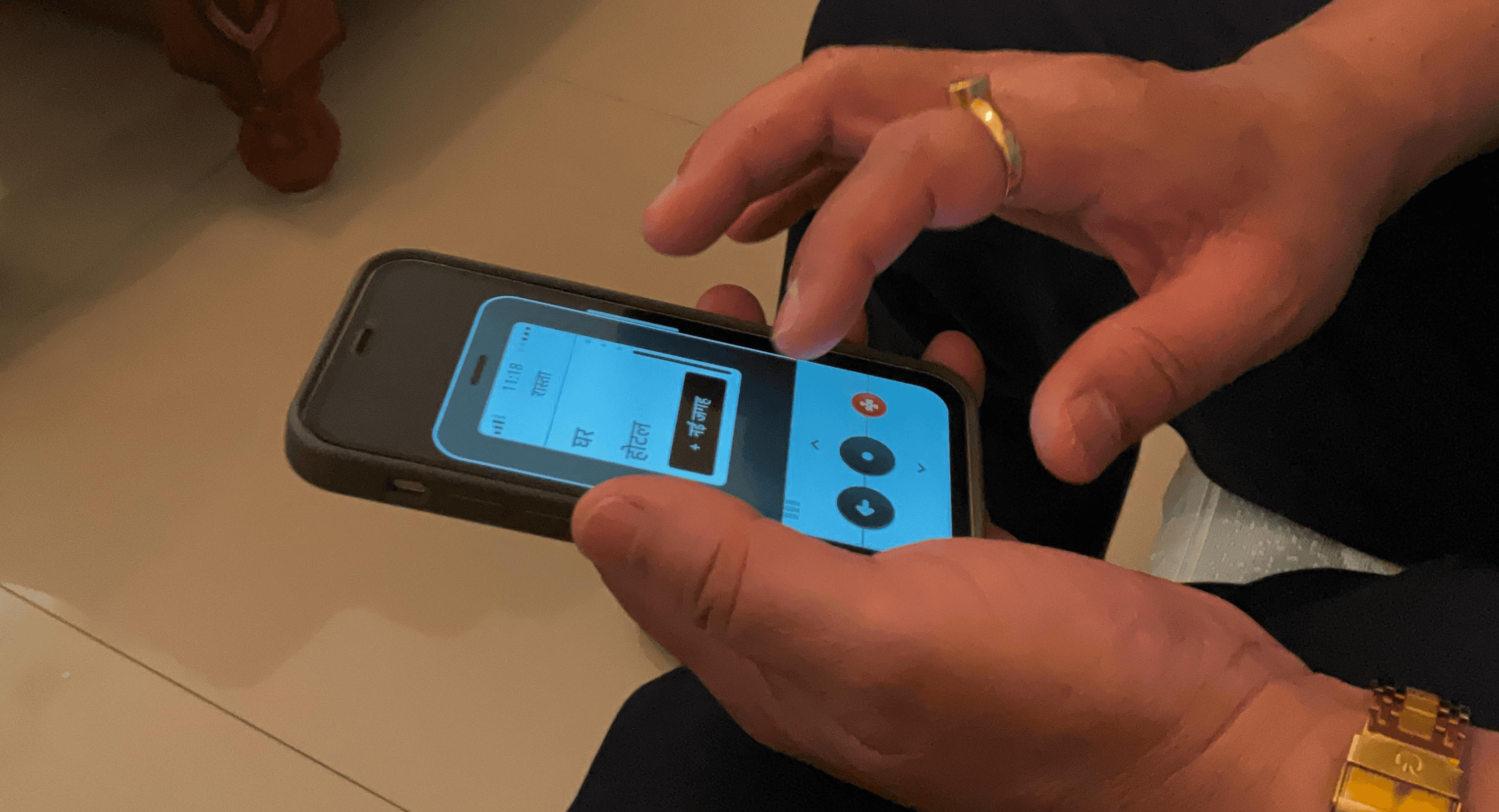
Stage 4: Physical controller
This was the final stage of user testing where I coded and linked a 3D-printed controller with the 3 buttons, onto my iPhone 12 mini, to test out the display and interaction cohesion.

The device was tested with 20+ elderly and they all loved it. Many visualised how this device could have helped them based on their past experiences. One of my favourite narrations is mentioned below:
“Once I was visiting my son’s house in Noida. They have multi-storey apartments that all look identical. I went out for a walk in the evening and when I wanted to return, I was not able to recognize my apartment. The walk mode could have been of great help.”
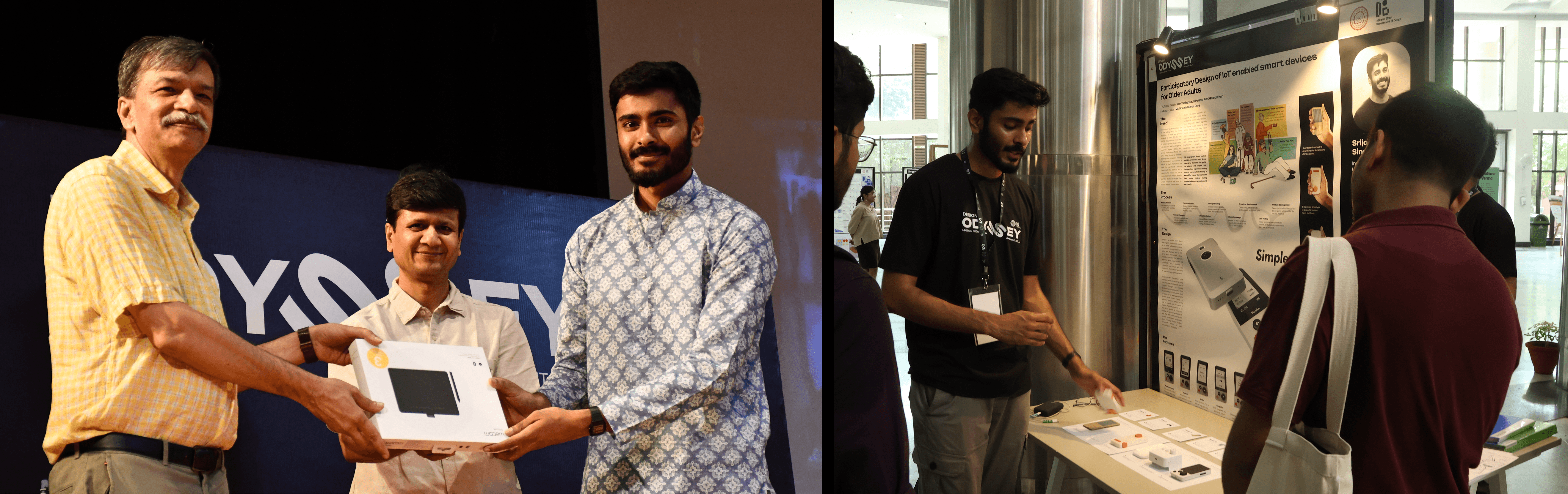
This project was showcased at the Design Degree Show 2024 at IIT Delhi, where it was recognized as one of the top 5 thesis projects and received an award along with some goodies. Despite the efforts, it could not make it to production due to the financial goals of Lava, but if you are interested to know more and bring this project to life, I would be happy to connect.
A new generation feature phone specifically designed for the needs of the elderly adults.
Overview
This is my masters thesis project at IITD done in association with Lava Mobiles. It has been awarded top 5 thesis displays during the design degree show at IITD in 2024. The Indian cultural ethos emphasizes reverence and care for the elderly, reflecting a societal value deeply ingrained in its fabric. As the global population ages, India stands as a notable example with the proportion of elderly individuals projected to reach up to 20% by 2050 (UNFPA, 2023). This demographic shift underscores the urgent need for inclusive product design to cater to their specific needs and challenges. Elderly individuals face a myriad of unique obstacles encompassing various aspects of health and overall well-being. From physical frailty to sensory impairments and organ dysfunctions, these factors significantly impede their ability to perform even the most basic daily tasks, exacerbating their sense of dependence and vulnerability. When designing for the elderly, taking feedback and involving them in the process is more important than ever. This is due to the fact that the elderly being from a different generation have different mental models, perceptions, ideologies and concerns. Their perspectives, shaped by different experiences and concerns, offer valuable insights for creating solutions that truly meet their needs. Therefore, as I embark on my research journey, I prioritize understanding and addressing these unique considerations to develop designs that empower and enrich the lives of the elderly.
Why this project?
My grandfather enjoys living alone in his hometown, a place filled with cherished memories. While we respect his choice, he often faces challenges and is reluctant to seek help, which worries us about his well-being. Elderly individuals typically struggle with technology due to its complexities and their declining skills, despite its significant benefits. Therefore, this project aims to develop a smart IoT-enabled device to enhance the well-being of the elderly.
Initial research
The research started with, interviews and observations in various households with elderly residents. An understanding of their daily activities and challenges was developed. Since the target area of the project was consumer electronics, special attention was paid to the appliances and devices being used by the elderly. A study was done to map out the interactions happening in various smartphone tasks. The tasks were initially grouped into two categories: the tasks that are currently being used by the elderly, and the ones that have a potential for them to be able to use if the task complexity, challenge and risk levels were reduced. The interactions happening in these tasks were listed and the tasks were regrouped into 2 categories: Utility and entertainment.
Much of the technological advancements are happening in the field of wearable technology, so it was a worthwhile consideration to understand the perception of the elderly towards smartwatches. Smartwatches nowadays offer a lot of features including health monitoring, location tracking, and even calling. Despite this plethora of features being offered right at the wrist, smartwatches are not very actively being used by the elderly because of multiple reasons such as small screen size, tiny font size, complex interfaces, discomfort while wearing for long durations, and difficulty in navigating through multiple functions. Additionally, the tiny displays and touch-based gestures pose significant challenges for elderly users who may have reduced dexterity and vision. To get a better understanding of these challenges, an elderly individual was introduced to a smartwatch and was requested to wear it for 24 hours. Observations were made on the usage, and detailed feedback was taken.
To dig deeper into understanding the problems faced by the elderly and their day-to-day activities, shadowing was done to map out the daily routine of an elderly individual. This mapping also includes the list of actions they perform, duration of tasks, targets that they interact with (categorised into gadgets and others owing to the scope of the research), emotional stage, and opportunities identified specific to the context. From the list of opportunities, two categories of opportunities can be noted, one is where there are potential risks and the other is where there are potential user experience enhancements possible. From these opportunities, various scenarios were created to highlight real-world problems in a story-like format. From each scenario, a potential intervention can be identified.
The user
Based on the insights drawn, the primary research conducted and an understanding of the company’s goals, a target user group was identified and a persona was developed. This persona is of an elderly male with a monthly income of 30,000 INR from pension and rent. He lives alone in a tier 3 city. The user faces certain major and minor health challenges. The children of the user are concerned about the health and well-being of the elderly. The user on the other hand wants to be independent and feels hesitant to disturb his children for what he considers as “minor inconveniences”. The user has been very comfortable with a keypad phone but was recently given a smartphone by his children. He feels that the device is very complicated but has managed to learn how to use YouTube on it, attend incoming calls, and make calls. All other features and applications are not used by the elderly. The user avoids carrying this phone while going outdoors as it feels too heavy in the pocket. The user now wishes to go back to using their keypad phone as they are also concerned about getting addicted to YouTube and declining eye-sight. Their children are concerned about this and try looking up portable small-size smart devices but can not find anything that meets their requirements.
The buyer
The majority of the time, it might not be an elderly individual who is making a purchase when it comes to buying gadgets. This could be due to their unfamiliarity with the technological advancements in the world. It is their children who end up buying things for them and making the gadget purchase decisions. This brings up a very interesting pointer: if the device could also cater to the needs of the buyers, then it becomes a more promising deal for them to invest in. Thus, the needs of the buyers were identified and a buyer persona was created. The persona is of a 35-year-old adult male who lives with his wife and kids in a Tier 1 city. The adult wants to develop his career and can not attend to his parent very frequently. (the parent being the user persona) He has requested his elderly parent to come live with him but the elderly does not like the tier 1 city’s lifestyle and feels more comfortable living in his self-built house in his hometown. This causes a lot of concern to the young adult who wants to ensure his parent’s well-being. He gifts him a smartphone to enable him to utilise some fun and engaging apps like YouTube and WhatsApp. His father often forgets to take his medicines and this bothers him a lot. He feels frustrated when he can not help his parent with the problems he is facing.
Secondary Research
After assessing the needs of the users and the buyers, a lot of potential design interventions can be thought of, but not all might be executable due to the technological constraints. To create feasible designs, a literature study was done on various technologies being used in the healthcare and consumer electronics industries. This study covered the following technologies:
Blood Pressure Measurement
Blood Oxygen Level Measurement (SpO2)
Pulse monitoring and ECG
Temperature Monitoring
Step counting and Fall detection
Glucose Monitoring
Navigation technologies
Touch screen technologies
Display technologies
Battery technologies
Smart phone and smart watch component breakdowns
The two types
There are 2 types of mobile phones in the market, The tactile keypad phones and the touch based smartphones. Despite the keypad phones being almost extinct in the Tier 1 cities, they are in high demand in Tier 2 and below cities. One of the major users of this device are the elderly. There are two categories of the features that the elderly engage with while using these phones. First is utility-based features, and second is entertainment-based. The proposed solution focuses on the utilitarian aspect to keep the focus precise.
Current solutions and their challenges
Reminder/memo apps help manage tasks and appointments effectively, but their usage
process is often cumbersome and confusing for the elderly.
UPI apps offer a convenient, cash-free payment experience, but their complex interfaces pose challenges and scam risks for the elderly.
Google Maps offers real-time navigation and location tracking, but its complicated and cluttered interface poses usability challenges for the elderly.
Assistive devices offer alternatives to touch based interfaces, aiding the elderly in technology interaction, yet their bulkiness and lack of portability pose convenience challenges.
Smartwatches offer health parameter measurement and fall monitoring, supplying vital
health data and safety alerts, yet discomfort and small displays deter many elderly users
Design Brief
To create a portable and ergonomic smart device for the elderly that enables them to enhance and upgrade their feature phone experience by allowing simplified interactions with traditionally complex tasks at par with their mental models.
Process
I followed a fluidic participatory design process for this project. This allowed me to involve the user at multiple stages of designing, ensuring that every decision is in tune with their needs.
The design: Simple
A next generation feature phone with essential utilitarian features that is portable, ergonomic and easy to use for the elderly.
The three buttons
An SOS button that can be tapped thrice to call help instantly.
A rotating knob selector for navigating.
A back button for going back/cancelling.
Features
Digital Payments: One of the key features of this device is an in-built wallet. The device integrates UPI lite to enable the elderly to make small digital transactions without having to memorize a pin.
Navigation: The device features a simplified version of the Maps app to allow the elderly to save locations and navigate to them. The device also provides the users to access their previously visited locations in the past 24 hours, saved every hour.
Health Monitoring: The device incorporates a PPG sensor and a temperature sensor on the back that allows the elderly to quickly monitor 3 essential health parameters: Heart rate, SpO2, and Body temperature.
Walk Mode: By default, the phone measures the device’s location every hour but upon detecting slow paced outdoor movement this mode is activated. Once activated, the device monitors the location constantly and can help the user trace their path back incase they get lost.
SOS & Fall detection: The device has a custom SOS button that can be activated in case of emergency by the user or can be initiated automatically if a fall is detected. Upon initiation, the location of the device is shared to the concerned and a call can also be initiated.
Reminders: The device provides a feature of Reminders that is completely voice operated. The user can add reminders as voice recordings and the smart algorithm would detect speech from text to alert the user on the said time.
Call: One of the most essential feature being used by the elderly. The device can display up
to 10 contacts. New contacts can be saved using voice.
Torch: The device has a torch on the top of the device which can be activated by tapping the power button twice.
Caregiver’s App: Apart from the mobile phone, an external app provides caregivers control to receive alerts, set reminders and monitor well-being of the elderly individuals. (This app was not developed in the limited scope and time constraints of this project.)
User testing
As mentioned in the beginning of this project, involving the elderly in every step of the process is pivotal for the design decisions. The user testing was done in multiple stages to ensure the same.
Stage 1: Input Methods
Navigation and input methods was one of the key interaction challenges that was to be solved. The phone required to have a simple interaction for navigating and inputing numbers. After exploring multiple options, 6 physical buttons were identified and collected in two 3-D printed prototypes. These prototypes were then tested with the users and rated based on comfort and usability. Open ended feedback was also received that helped refine the most preferred input type- the rotary knob.
Stage 2: Form
3 styrofoam forms were created with slight modifications in the fillets, chamfers and corner radii. These were then taken for feedback to a separate elderly audience for comfort and grip feedback.
Stage 3: Interface Testing
A touch based UI was created on Figma and presented to the elderly with specific tasks to be completed on the phone. This study evaluated the Usability, Readability, Cognitive Load, Process complexity and error rates. Feedback from this study was used to later refine the User Interface.
Stage 4: Physical controller
This was the final stage of user testing where I coded and linked a 3D-printed controller with the 3 buttons, onto my iPhone 12 mini, to test out the display and interaction cohesion.
The device was tested with 20+ elderly and they all loved it. Many visualised how this device could have helped them based on their past experiences. One of my favourite narrations is mentioned below:
“Once I was visiting my son’s house in Noida. They have multi-storey apartments that all look identical. I went out for a walk in the evening and when I wanted to return, I was not able to recognize my apartment. The walk mode could have been of great help.”
This project was showcased at the Design Degree Show 2024 at IIT Delhi, where it was recognized as one of the top 5 thesis projects and received an award along with some goodies. Despite the efforts, it could not make it to production due to the financial goals of Lava, but if you are interested to know more and bring this project to life, I would be happy to connect.
A new generation feature phone specifically designed for the needs of the elderly adults.
Overview
This is my masters thesis project at IITD done in association with Lava Mobiles. It has been awarded top 5 thesis displays during the design degree show at IITD in 2024. The Indian cultural ethos emphasizes reverence and care for the elderly, reflecting a societal value deeply ingrained in its fabric. As the global population ages, India stands as a notable example with the proportion of elderly individuals projected to reach up to 20% by 2050 (UNFPA, 2023). This demographic shift underscores the urgent need for inclusive product design to cater to their specific needs and challenges. Elderly individuals face a myriad of unique obstacles encompassing various aspects of health and overall well-being. From physical frailty to sensory impairments and organ dysfunctions, these factors significantly impede their ability to perform even the most basic daily tasks, exacerbating their sense of dependence and vulnerability. When designing for the elderly, taking feedback and involving them in the process is more important than ever. This is due to the fact that the elderly being from a different generation have different mental models, perceptions, ideologies and concerns. Their perspectives, shaped by different experiences and concerns, offer valuable insights for creating solutions that truly meet their needs. Therefore, as I embark on my research journey, I prioritize understanding and addressing these unique considerations to develop designs that empower and enrich the lives of the elderly.
Why this project?
My grandfather enjoys living alone in his hometown, a place filled with cherished memories. While we respect his choice, he often faces challenges and is reluctant to seek help, which worries us about his well-being. Elderly individuals typically struggle with technology due to its complexities and their declining skills, despite its significant benefits. Therefore, this project aims to develop a smart IoT-enabled device to enhance the well-being of the elderly.
Initial research
The research started with, interviews and observations in various households with elderly residents. An understanding of their daily activities and challenges was developed. Since the target area of the project was consumer electronics, special attention was paid to the appliances and devices being used by the elderly. A study was done to map out the interactions happening in various smartphone tasks. The tasks were initially grouped into two categories: the tasks that are currently being used by the elderly, and the ones that have a potential for them to be able to use if the task complexity, challenge and risk levels were reduced. The interactions happening in these tasks were listed and the tasks were regrouped into 2 categories: Utility and entertainment.
Much of the technological advancements are happening in the field of wearable technology, so it was a worthwhile consideration to understand the perception of the elderly towards smartwatches. Smartwatches nowadays offer a lot of features including health monitoring, location tracking, and even calling. Despite this plethora of features being offered right at the wrist, smartwatches are not very actively being used by the elderly because of multiple reasons such as small screen size, tiny font size, complex interfaces, discomfort while wearing for long durations, and difficulty in navigating through multiple functions. Additionally, the tiny displays and touch-based gestures pose significant challenges for elderly users who may have reduced dexterity and vision. To get a better understanding of these challenges, an elderly individual was introduced to a smartwatch and was requested to wear it for 24 hours. Observations were made on the usage, and detailed feedback was taken.
To dig deeper into understanding the problems faced by the elderly and their day-to-day activities, shadowing was done to map out the daily routine of an elderly individual. This mapping also includes the list of actions they perform, duration of tasks, targets that they interact with (categorised into gadgets and others owing to the scope of the research), emotional stage, and opportunities identified specific to the context. From the list of opportunities, two categories of opportunities can be noted, one is where there are potential risks and the other is where there are potential user experience enhancements possible. From these opportunities, various scenarios were created to highlight real-world problems in a story-like format. From each scenario, a potential intervention can be identified.
The user
Based on the insights drawn, the primary research conducted and an understanding of the company’s goals, a target user group was identified and a persona was developed. This persona is of an elderly male with a monthly income of 30,000 INR from pension and rent. He lives alone in a tier 3 city. The user faces certain major and minor health challenges. The children of the user are concerned about the health and well-being of the elderly. The user on the other hand wants to be independent and feels hesitant to disturb his children for what he considers as “minor inconveniences”. The user has been very comfortable with a keypad phone but was recently given a smartphone by his children. He feels that the device is very complicated but has managed to learn how to use YouTube on it, attend incoming calls, and make calls. All other features and applications are not used by the elderly. The user avoids carrying this phone while going outdoors as it feels too heavy in the pocket. The user now wishes to go back to using their keypad phone as they are also concerned about getting addicted to YouTube and declining eye-sight. Their children are concerned about this and try looking up portable small-size smart devices but can not find anything that meets their requirements.
The buyer
The majority of the time, it might not be an elderly individual who is making a purchase when it comes to buying gadgets. This could be due to their unfamiliarity with the technological advancements in the world. It is their children who end up buying things for them and making the gadget purchase decisions. This brings up a very interesting pointer: if the device could also cater to the needs of the buyers, then it becomes a more promising deal for them to invest in. Thus, the needs of the buyers were identified and a buyer persona was created. The persona is of a 35-year-old adult male who lives with his wife and kids in a Tier 1 city. The adult wants to develop his career and can not attend to his parent very frequently. (the parent being the user persona) He has requested his elderly parent to come live with him but the elderly does not like the tier 1 city’s lifestyle and feels more comfortable living in his self-built house in his hometown. This causes a lot of concern to the young adult who wants to ensure his parent’s well-being. He gifts him a smartphone to enable him to utilise some fun and engaging apps like YouTube and WhatsApp. His father often forgets to take his medicines and this bothers him a lot. He feels frustrated when he can not help his parent with the problems he is facing.
Secondary Research
After assessing the needs of the users and the buyers, a lot of potential design interventions can be thought of, but not all might be executable due to the technological constraints. To create feasible designs, a literature study was done on various technologies being used in the healthcare and consumer electronics industries. This study covered the following technologies:
Blood Pressure Measurement
Blood Oxygen Level Measurement (SpO2)
Pulse monitoring and ECG
Temperature Monitoring
Step counting and Fall detection
Glucose Monitoring
Navigation technologies
Touch screen technologies
Display technologies
Battery technologies
Smart phone and smart watch component breakdowns
The two types
There are 2 types of mobile phones in the market, The tactile keypad phones and the touch based smartphones. Despite the keypad phones being almost extinct in the Tier 1 cities, they are in high demand in Tier 2 and below cities. One of the major users of this device are the elderly. There are two categories of the features that the elderly engage with while using these phones. First is utility-based features, and second is entertainment-based. The proposed solution focuses on the utilitarian aspect to keep the focus precise.
Current solutions and their challenges
Reminder/memo apps help manage tasks and appointments effectively, but their usage
process is often cumbersome and confusing for the elderly.
UPI apps offer a convenient, cash-free payment experience, but their complex interfaces pose challenges and scam risks for the elderly.
Google Maps offers real-time navigation and location tracking, but its complicated and cluttered interface poses usability challenges for the elderly.
Assistive devices offer alternatives to touch based interfaces, aiding the elderly in technology interaction, yet their bulkiness and lack of portability pose convenience challenges.
Smartwatches offer health parameter measurement and fall monitoring, supplying vital
health data and safety alerts, yet discomfort and small displays deter many elderly users
Design Brief
To create a portable and ergonomic smart device for the elderly that enables them to enhance and upgrade their feature phone experience by allowing simplified interactions with traditionally complex tasks at par with their mental models.
Process
I followed a fluidic participatory design process for this project. This allowed me to involve the user at multiple stages of designing, ensuring that every decision is in tune with their needs.
The design: Simple
A next generation feature phone with essential utilitarian features that is portable, ergonomic and easy to use for the elderly.
The three buttons
An SOS button that can be tapped thrice to call help instantly.
A rotating knob selector for navigating.
A back button for going back/cancelling.
Features
Digital Payments: One of the key features of this device is an in-built wallet. The device integrates UPI lite to enable the elderly to make small digital transactions without having to memorize a pin.
Navigation: The device features a simplified version of the Maps app to allow the elderly to save locations and navigate to them. The device also provides the users to access their previously visited locations in the past 24 hours, saved every hour.
Health Monitoring: The device incorporates a PPG sensor and a temperature sensor on the back that allows the elderly to quickly monitor 3 essential health parameters: Heart rate, SpO2, and Body temperature.
Walk Mode: By default, the phone measures the device’s location every hour but upon detecting slow paced outdoor movement this mode is activated. Once activated, the device monitors the location constantly and can help the user trace their path back incase they get lost.
SOS & Fall detection: The device has a custom SOS button that can be activated in case of emergency by the user or can be initiated automatically if a fall is detected. Upon initiation, the location of the device is shared to the concerned and a call can also be initiated.
Reminders: The device provides a feature of Reminders that is completely voice operated. The user can add reminders as voice recordings and the smart algorithm would detect speech from text to alert the user on the said time.
Call: One of the most essential feature being used by the elderly. The device can display up
to 10 contacts. New contacts can be saved using voice.
Torch: The device has a torch on the top of the device which can be activated by tapping the power button twice.
Caregiver’s App: Apart from the mobile phone, an external app provides caregivers control to receive alerts, set reminders and monitor well-being of the elderly individuals. (This app was not developed in the limited scope and time constraints of this project.)
User testing
As mentioned in the beginning of this project, involving the elderly in every step of the process is pivotal for the design decisions. The user testing was done in multiple stages to ensure the same.
Stage 1: Input Methods
Navigation and input methods was one of the key interaction challenges that was to be solved. The phone required to have a simple interaction for navigating and inputing numbers. After exploring multiple options, 6 physical buttons were identified and collected in two 3-D printed prototypes. These prototypes were then tested with the users and rated based on comfort and usability. Open ended feedback was also received that helped refine the most preferred input type- the rotary knob.
Stage 2: Form
3 styrofoam forms were created with slight modifications in the fillets, chamfers and corner radii. These were then taken for feedback to a separate elderly audience for comfort and grip feedback.
Stage 3: Interface Testing
A touch based UI was created on Figma and presented to the elderly with specific tasks to be completed on the phone. This study evaluated the Usability, Readability, Cognitive Load, Process complexity and error rates. Feedback from this study was used to later refine the User Interface.
Stage 4: Physical controller
This was the final stage of user testing where I coded and linked a 3D-printed controller with the 3 buttons, onto my iPhone 12 mini, to test out the display and interaction cohesion.
The device was tested with 20+ elderly and they all loved it. Many visualised how this device could have helped them based on their past experiences. One of my favourite narrations is mentioned below:
“Once I was visiting my son’s house in Noida. They have multi-storey apartments that all look identical. I went out for a walk in the evening and when I wanted to return, I was not able to recognize my apartment. The walk mode could have been of great help.”
This project was showcased at the Design Degree Show 2024 at IIT Delhi, where it was recognized as one of the top 5 thesis projects and received an award along with some goodies. Despite the efforts, it could not make it to production due to the financial goals of Lava, but if you are interested to know more and bring this project to life, I would be happy to connect.
A new generation feature phone specifically designed for the needs of the elderly adults.
Overview
This is my masters thesis project at IITD done in association with Lava Mobiles. It has been awarded top 5 thesis displays during the design degree show at IITD in 2024. The Indian cultural ethos emphasizes reverence and care for the elderly, reflecting a societal value deeply ingrained in its fabric. As the global population ages, India stands as a notable example with the proportion of elderly individuals projected to reach up to 20% by 2050 (UNFPA, 2023). This demographic shift underscores the urgent need for inclusive product design to cater to their specific needs and challenges. Elderly individuals face a myriad of unique obstacles encompassing various aspects of health and overall well-being. From physical frailty to sensory impairments and organ dysfunctions, these factors significantly impede their ability to perform even the most basic daily tasks, exacerbating their sense of dependence and vulnerability. When designing for the elderly, taking feedback and involving them in the process is more important than ever. This is due to the fact that the elderly being from a different generation have different mental models, perceptions, ideologies and concerns. Their perspectives, shaped by different experiences and concerns, offer valuable insights for creating solutions that truly meet their needs. Therefore, as I embark on my research journey, I prioritize understanding and addressing these unique considerations to develop designs that empower and enrich the lives of the elderly.
Why this project?
My grandfather enjoys living alone in his hometown, a place filled with cherished memories. While we respect his choice, he often faces challenges and is reluctant to seek help, which worries us about his well-being. Elderly individuals typically struggle with technology due to its complexities and their declining skills, despite its significant benefits. Therefore, this project aims to develop a smart IoT-enabled device to enhance the well-being of the elderly.
Initial research
The research started with, interviews and observations in various households with elderly residents. An understanding of their daily activities and challenges was developed. Since the target area of the project was consumer electronics, special attention was paid to the appliances and devices being used by the elderly. A study was done to map out the interactions happening in various smartphone tasks. The tasks were initially grouped into two categories: the tasks that are currently being used by the elderly, and the ones that have a potential for them to be able to use if the task complexity, challenge and risk levels were reduced. The interactions happening in these tasks were listed and the tasks were regrouped into 2 categories: Utility and entertainment.
Much of the technological advancements are happening in the field of wearable technology, so it was a worthwhile consideration to understand the perception of the elderly towards smartwatches. Smartwatches nowadays offer a lot of features including health monitoring, location tracking, and even calling. Despite this plethora of features being offered right at the wrist, smartwatches are not very actively being used by the elderly because of multiple reasons such as small screen size, tiny font size, complex interfaces, discomfort while wearing for long durations, and difficulty in navigating through multiple functions. Additionally, the tiny displays and touch-based gestures pose significant challenges for elderly users who may have reduced dexterity and vision. To get a better understanding of these challenges, an elderly individual was introduced to a smartwatch and was requested to wear it for 24 hours. Observations were made on the usage, and detailed feedback was taken.
To dig deeper into understanding the problems faced by the elderly and their day-to-day activities, shadowing was done to map out the daily routine of an elderly individual. This mapping also includes the list of actions they perform, duration of tasks, targets that they interact with (categorised into gadgets and others owing to the scope of the research), emotional stage, and opportunities identified specific to the context. From the list of opportunities, two categories of opportunities can be noted, one is where there are potential risks and the other is where there are potential user experience enhancements possible. From these opportunities, various scenarios were created to highlight real-world problems in a story-like format. From each scenario, a potential intervention can be identified.
The user
Based on the insights drawn, the primary research conducted and an understanding of the company’s goals, a target user group was identified and a persona was developed. This persona is of an elderly male with a monthly income of 30,000 INR from pension and rent. He lives alone in a tier 3 city. The user faces certain major and minor health challenges. The children of the user are concerned about the health and well-being of the elderly. The user on the other hand wants to be independent and feels hesitant to disturb his children for what he considers as “minor inconveniences”. The user has been very comfortable with a keypad phone but was recently given a smartphone by his children. He feels that the device is very complicated but has managed to learn how to use YouTube on it, attend incoming calls, and make calls. All other features and applications are not used by the elderly. The user avoids carrying this phone while going outdoors as it feels too heavy in the pocket. The user now wishes to go back to using their keypad phone as they are also concerned about getting addicted to YouTube and declining eye-sight. Their children are concerned about this and try looking up portable small-size smart devices but can not find anything that meets their requirements.
The buyer
The majority of the time, it might not be an elderly individual who is making a purchase when it comes to buying gadgets. This could be due to their unfamiliarity with the technological advancements in the world. It is their children who end up buying things for them and making the gadget purchase decisions. This brings up a very interesting pointer: if the device could also cater to the needs of the buyers, then it becomes a more promising deal for them to invest in. Thus, the needs of the buyers were identified and a buyer persona was created. The persona is of a 35-year-old adult male who lives with his wife and kids in a Tier 1 city. The adult wants to develop his career and can not attend to his parent very frequently. (the parent being the user persona) He has requested his elderly parent to come live with him but the elderly does not like the tier 1 city’s lifestyle and feels more comfortable living in his self-built house in his hometown. This causes a lot of concern to the young adult who wants to ensure his parent’s well-being. He gifts him a smartphone to enable him to utilise some fun and engaging apps like YouTube and WhatsApp. His father often forgets to take his medicines and this bothers him a lot. He feels frustrated when he can not help his parent with the problems he is facing.
Secondary Research
After assessing the needs of the users and the buyers, a lot of potential design interventions can be thought of, but not all might be executable due to the technological constraints. To create feasible designs, a literature study was done on various technologies being used in the healthcare and consumer electronics industries. This study covered the following technologies:
Blood Pressure Measurement
Blood Oxygen Level Measurement (SpO2)
Pulse monitoring and ECG
Temperature Monitoring
Step counting and Fall detection
Glucose Monitoring
Navigation technologies
Touch screen technologies
Display technologies
Battery technologies
Smart phone and smart watch component breakdowns
The two types
There are 2 types of mobile phones in the market, The tactile keypad phones and the touch based smartphones. Despite the keypad phones being almost extinct in the Tier 1 cities, they are in high demand in Tier 2 and below cities. One of the major users of this device are the elderly. There are two categories of the features that the elderly engage with while using these phones. First is utility-based features, and second is entertainment-based. The proposed solution focuses on the utilitarian aspect to keep the focus precise.
Current solutions and their challenges
Reminder/memo apps help manage tasks and appointments effectively, but their usage
process is often cumbersome and confusing for the elderly.
UPI apps offer a convenient, cash-free payment experience, but their complex interfaces pose challenges and scam risks for the elderly.
Google Maps offers real-time navigation and location tracking, but its complicated and cluttered interface poses usability challenges for the elderly.
Assistive devices offer alternatives to touch based interfaces, aiding the elderly in technology interaction, yet their bulkiness and lack of portability pose convenience challenges.
Smartwatches offer health parameter measurement and fall monitoring, supplying vital
health data and safety alerts, yet discomfort and small displays deter many elderly users
Design Brief
To create a portable and ergonomic smart device for the elderly that enables them to enhance and upgrade their feature phone experience by allowing simplified interactions with traditionally complex tasks at par with their mental models.
Process
I followed a fluidic participatory design process for this project. This allowed me to involve the user at multiple stages of designing, ensuring that every decision is in tune with their needs.
The design: Simple
A next generation feature phone with essential utilitarian features that is portable, ergonomic and easy to use for the elderly.
The three buttons
An SOS button that can be tapped thrice to call help instantly.
A rotating knob selector for navigating.
A back button for going back/cancelling.
Features
Digital Payments: One of the key features of this device is an in-built wallet. The device integrates UPI lite to enable the elderly to make small digital transactions without having to memorize a pin.
Navigation: The device features a simplified version of the Maps app to allow the elderly to save locations and navigate to them. The device also provides the users to access their previously visited locations in the past 24 hours, saved every hour.
Health Monitoring: The device incorporates a PPG sensor and a temperature sensor on the back that allows the elderly to quickly monitor 3 essential health parameters: Heart rate, SpO2, and Body temperature.
Walk Mode: By default, the phone measures the device’s location every hour but upon detecting slow paced outdoor movement this mode is activated. Once activated, the device monitors the location constantly and can help the user trace their path back incase they get lost.
SOS & Fall detection: The device has a custom SOS button that can be activated in case of emergency by the user or can be initiated automatically if a fall is detected. Upon initiation, the location of the device is shared to the concerned and a call can also be initiated.
Reminders: The device provides a feature of Reminders that is completely voice operated. The user can add reminders as voice recordings and the smart algorithm would detect speech from text to alert the user on the said time.
Call: One of the most essential feature being used by the elderly. The device can display up
to 10 contacts. New contacts can be saved using voice.
Torch: The device has a torch on the top of the device which can be activated by tapping the power button twice.
Caregiver’s App: Apart from the mobile phone, an external app provides caregivers control to receive alerts, set reminders and monitor well-being of the elderly individuals. (This app was not developed in the limited scope and time constraints of this project.)
User testing
As mentioned in the beginning of this project, involving the elderly in every step of the process is pivotal for the design decisions. The user testing was done in multiple stages to ensure the same.
Stage 1: Input Methods
Navigation and input methods was one of the key interaction challenges that was to be solved. The phone required to have a simple interaction for navigating and inputing numbers. After exploring multiple options, 6 physical buttons were identified and collected in two 3-D printed prototypes. These prototypes were then tested with the users and rated based on comfort and usability. Open ended feedback was also received that helped refine the most preferred input type- the rotary knob.
Stage 2: Form
3 styrofoam forms were created with slight modifications in the fillets, chamfers and corner radii. These were then taken for feedback to a separate elderly audience for comfort and grip feedback.
Stage 3: Interface Testing
A touch based UI was created on Figma and presented to the elderly with specific tasks to be completed on the phone. This study evaluated the Usability, Readability, Cognitive Load, Process complexity and error rates. Feedback from this study was used to later refine the User Interface.
Stage 4: Physical controller
This was the final stage of user testing where I coded and linked a 3D-printed controller with the 3 buttons, onto my iPhone 12 mini, to test out the display and interaction cohesion.
The device was tested with 20+ elderly and they all loved it. Many visualised how this device could have helped them based on their past experiences. One of my favourite narrations is mentioned below:
“Once I was visiting my son’s house in Noida. They have multi-storey apartments that all look identical. I went out for a walk in the evening and when I wanted to return, I was not able to recognize my apartment. The walk mode could have been of great help.”
This project was showcased at the Design Degree Show 2024 at IIT Delhi, where it was recognized as one of the top 5 thesis projects and received an award along with some goodies. Despite the efforts, it could not make it to production due to the financial goals of Lava, but if you are interested to know more and bring this project to life, I would be happy to connect.